AWS Resilience Hub: Keep Workload Scope and Recovery Targets Aligned

Most resilience plans describe the system as it was on the day someone wrote them. A migration adds a cross-Region call, a shared namespace blurs which pods belong to which service, and the recovery targets stay the same. This guide shows how to use three September 2026 additions to AWS Resilience Hub to keep scope, dependencies and recovery targets tied to what is actually running.
What changed, and why it matters
According to the AWS Architecture Blog, the Next generation of AWS Resilience Hub gained three capabilities on 18 September 2026 [1]:
- Amazon EKS label support for service input sources. You can select the Kubernetes resources that make up a service using labels your teams already apply.
- Generative AI-powered Dependency Insights. It summarises a service's discovered dependencies and highlights patterns worth reviewing.
- Resilience policy sharing through AWS Organizations. A central team defines requirements once and makes them available to member accounts.
These sit on top of a new application model. In the next generation of Resilience Hub the unit of assessment is a service; services are grouped into systems, and user journeys describe paths through them. AWS also describes resilience policies as now composable, combining disaster recovery (DR), availability SLO (service level objective) and data recovery conditions in one policy rather than a single RTO/RPO pair [2]. RTO, the recovery time objective, is how quickly you must recover; RPO, the recovery point objective, is how much data loss you can tolerate.
For UK teams, the supported Regions list includes Europe (London), eu-west-2, alongside Ireland, Frankfurt, Paris and Stockholm [5]. Check that list before you plan, because the next-generation features are not available everywhere.
Step one: define the service boundary with labels
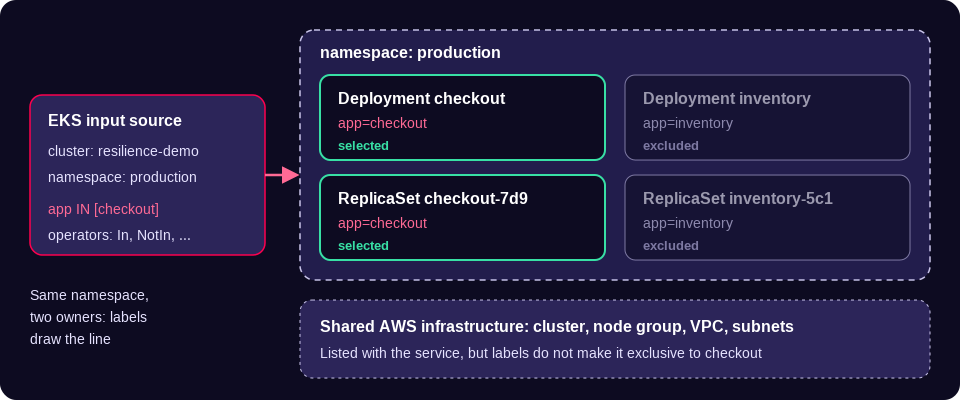
A service input source tells Resilience Hub where to find a service's resources. It can be a CloudFormation stack, a Terraform state file, resource tags or an EKS cluster [1]. For EKS you choose a cluster and namespaces, and you can now add label selectors to filter objects within each namespace. Each selector has a key, an operator and values. Selectors in the same namespace are combined with AND, so an object must match all of them. With no selector, every supported object in the chosen namespaces is discovered [1].
This matters in shared namespaces. In AWS's worked example, checkout and inventory both run in production; selecting app In checkout includes checkout's Deployment and ReplicaSet and leaves inventory out [1].
Labels only work if they are applied consistently. Kubernetes publishes a set of recommended labels, such as app.kubernetes.io/name, app.kubernetes.io/part-of and app.kubernetes.io/component [6]. Pick one key as the service boundary and enforce it in your templates.
apiVersion: apps/v1
kind: Deployment
metadata:
  name: checkout
  namespace: production
  labels:
    app: checkout
    app.kubernetes.io/part-of: online-store
spec:
  selector:
    matchLabels:
      app: checkout
  template:
    metadata:
      labels:
        app: checkout
        app.kubernetes.io/part-of: online-store
    spec:
      containers:
        - name: checkout
          image: example.com/checkout:1.4.2
Before you create the input source, preview what the same selector matches with kubectl. Resilience Hub only discovers the object types it supports, so treat this as a sanity check rather than an exact match:
kubectl get deployments,replicasets,pods,services -n production -l 'app in (checkout)'Then create the service and its EKS input source. The console shows operators as In, NotIn, Exists and NotExists; the API uses IN, NOT_IN, EXISTS and DOES_NOT_EXIST [1]. These commands follow AWS's published example; replace the role name and cluster ARN with your own:
SERVICE_ARN=$(aws resiliencehubv2 create-service \
  --profile workload \
  --name checkout \
  --regions "$AWS_REGION" \
  --permission-model '{"invokerRoleName": "ResilienceHubRole"}' \
  --dependency-discovery ENABLED \
  --query 'service.serviceArn' --output text)

aws resiliencehubv2 create-input-source \
  --profile workload \
  --service-arn "$SERVICE_ARN" \
  --resource-configuration '{
    "eks": {
      "clusterArn": "arn:aws:eks:eu-west-2:111122223333:cluster/resilience-demo",
      "namespaces": ["production"],
      "labelSelector": {
        "matchExpressions": [
          {"key": "app", "operator": "IN", "values": ["checkout"]}
        ]
      }
    }
  }'
The role needs the AWSResilienceHubV2AssessmentExecutionPolicy managed policy, plus Kubernetes RBAC permissions and an EKS access entry so it can read cluster objects [1].
Step two: find out what the service really depends on
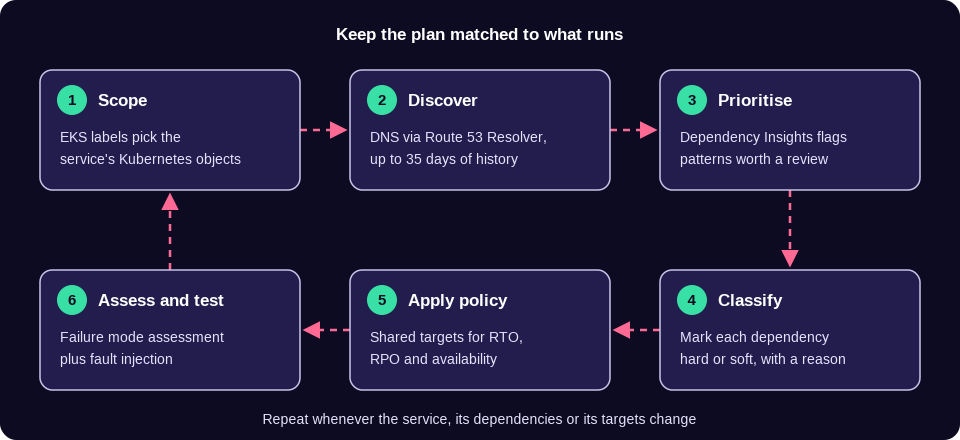
Dependency discovery is an optional, separately priced feature. It analyses DNS activity through Amazon Route 53 Resolver, needs no agent, examines up to 35 days of history and keeps monitoring for changes [1]. Dependency Insights then filters out routine service traffic and highlights four kinds of pattern [1]:
| Pattern | The question to ask |
|---|---|
| Cross-Region dependency | Is the call to another Region intentional, and does the recovery design account for it? |
| New dependency (first seen in the last seven days) | Has the architecture changed without the documentation changing? |
| Third-party dependency | What does the service do when the external provider is down? |
| Uneven usage | Is this a scheduled job, or something used only at certain times, such as image pulls at pod start? |
In AWS's example, insights for checkout covered 29 dependencies and included a DynamoDB table reached in another Region. If checkout cannot accept orders without that table, a disruption in the remote Region stops checkout even while its EKS resources look healthy [1]. That is exactly the kind of coupling a recovery plan written before the migration would miss.
Know the limits before you rely on the list. AWS documents that connections made directly by IP address are not discovered, Lambda functions without VPC connectivity are not covered, dependencies called less than once an hour may be missed initially, and multi-tenant EKS clusters can attribute a dependency to the wrong service [3]. Insights can be regenerated once every 24 hours, and a new workload's insights only reflect the history it has generated so far [1]. AWS is explicit that insights prioritise review and do not prescribe fixes [1].
Turn each finding into a decision by classifying the dependency. Hard means the service fails without it; soft means it degrades but keeps running [1]:
aws resiliencehubv2 update-dependency \
  --profile workload \
  --service-arn "$SERVICE_ARN" \
  --dependency-id "<dependency-id>" \
  --criticality HARD \
  --comment "Checkout writes orders to this table and cannot accept orders without it."
The comment is the useful part. It records an assumption that someone must later prove or disprove with a test.
Step three: set targets once, centrally
A policy can combine four target types: availability, recovery from an Availability Zone disruption, recovery from a Regional disruption, and data recovery [1]. Only the management account or a delegated administrator can enable cross-account sharing [7], after a one-time integration that enables trusted access and creates a service-linked role [1]. AWS's example creates an organisation-shared policy like this (the targets are illustrative; agree real values with the business):
POLICY_ARN=$(aws resiliencehubv2 create-policy \
  --profile management \
  --name tier-1-critical \
  --availability-slo '{"target": 99.9}' \
  --multi-az '{"rtoInMinutes": 5, "rpoInMinutes": 1, "disasterRecoveryApproach": "ACTIVE_ACTIVE"}' \
  --multi-region '{"rtoInMinutes": 15, "rpoInMinutes": 5, "disasterRecoveryApproach": "WARM_STANDBY"}' \
  --data-recovery '{"timeBetweenBackupsInMinutes": 60}' \
  --sharing-enabled \
  --query 'policy.policyArn' --output text)
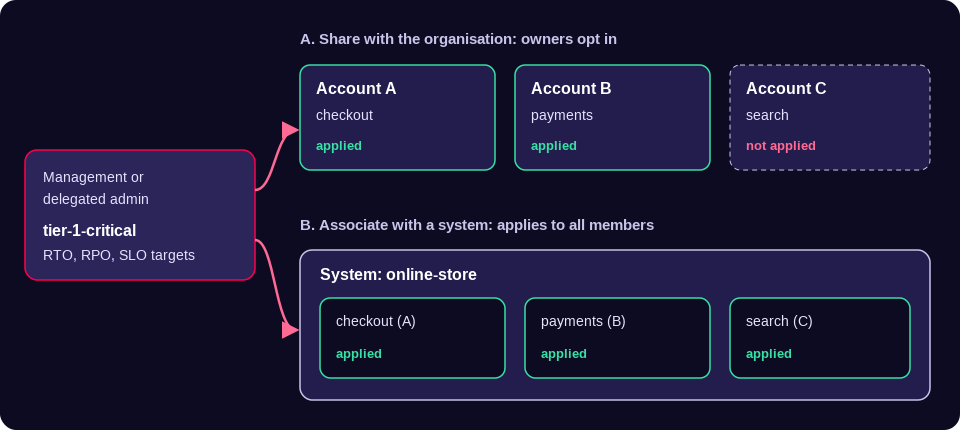
There are two ways to get a central policy onto services, and they behave differently [4]:
| Share with the organisation | Associate with a system | |
|---|---|---|
| Who decides | Each service owner chooses whether to apply it | The central team; applies to every associated service |
| Visibility | Appears in every member account; the ARN shows the owner | Applies regardless of which account owns the service |
| Best for | Teams that own their adoption decision | Requirements that must apply without opt-in |
| Tracking | Attachment and detachment events per policy | System membership |
Two behaviours catch people out. Turning sharing off stops evaluating member services against the policy and removes it from the services that used it [7], so treat that switch as a change with blast radius. And an attachment event confirms adoption, not compliance: after attaching the policy in AWS's walkthrough, targets moved to "Pending failure mode assessment" [1].
A playbook for your first service
- Pick one service you understand. AWS's own advice is to start with a service whose architecture and ownership you know [1]. Write down its intended dependencies before you look at any discovered data.
- Agree the label contract. Choose the key that marks the service boundary, add it to Helm or Kustomize templates, and preview the selection with
kubectl -l. - Create the service with discovery on. Use the input source above and confirm the resource types with
aws resiliencehubv2 list-resources. - Wait for history. Give discovery time to see a full business cycle, including batch jobs and month-end runs, before you trust the list.
- Generate insights and diff them against your notes. Every surprise is either a documentation bug or an architecture bug.
- Classify dependencies. Mark each as hard or soft with a one-line reason that a test could falsify.
- Agree targets with the business. Dependency findings inform the policy discussion; they do not set the targets [1]. Then apply the shared policy, or associate it through a system if it must not be optional.
- Prove it. Run the failure mode assessment, then test the hard dependencies. AWS Fault Injection Service runs experiments with actions, targets and stop conditions, and AWS recommends planning and running them in pre-production first [8].
Checklist
- Every Deployment, StatefulSet and Service carries the boundary label, enforced in templates.
- The service is in a supported Region, such as eu-west-2 for London [5].
- The assessment role has the managed policy, RBAC permissions and an EKS access entry.
- Dependency discovery is enabled and the cost has been approved.
- Known blind spots (IP-only connections, non-VPC Lambda, rare calls) are listed and checked by hand [3].
- Every hard dependency has a reason and a planned test.
- Policy targets were agreed with the business, not copied from an example.
- Someone owns the decision to change or stop sharing a central policy.
Common mistakes to avoid
- Treating attachment as compliance. A green "applied" status means the target exists. The assessment and your tests decide whether you meet it.
- Trusting a young dependency list. A week of history will miss quarterly jobs and rarely called third parties.
- Using labels that drift. If one team uses
appand anotherservice, the boundary silently shrinks. - Assuming labels isolate infrastructure. The cluster, node group and network are shared; their failure modes are still yours.
- Turning off sharing to "tidy up". It removes the policy from every member service that used it [7].
- Letting the AI summary replace the review. Insights point at questions; architects answer them.
What to do this week
- Check the supported Regions list against where your critical services run [5].
- Run
kubectl get deploy -A --show-labelson one cluster and note which workloads lack a consistent boundary label. - For one service, write its expected dependency list on a single page, ready to compare with discovered data.
- Draft one tier-1 policy with RTO and RPO numbers and book 30 minutes with the business owner to agree them.
- Choose the one hard dependency you most doubt and schedule a pre-production fault injection test for it.
Resilience Hub will not make a service resilient on its own, but it can stop your plan and your platform drifting apart, which is where most unpleasant surprises start. If you would like help running this loop alongside day-to-day operations, our SysOps 24/7 team does this work for UK teams on AWS and Kubernetes.
References
- Scope workloads and share resilience policies with AWS Resilience Hub, AWS Architecture Blog, 13 October 2026.
- What changes with Next generation Resilience Hub, AWS Resilience Hub User Guide.
- Coverage and known limitations (dependency discovery), AWS Resilience Hub User Guide.
- Applying resilience policies across accounts, AWS Resilience Hub User Guide.
- Supported Regions and availability, AWS Resilience Hub User Guide.
- Recommended Labels, Kubernetes documentation.
- Sharing a policy across your organization, AWS Resilience Hub User Guide.
- What is AWS Fault Injection Service?, AWS FIS User Guide.